
GDCC 0.0.3: More Complete GDScript Semantics, a More Complete Experience
GDCC is a compiler that compiles GDScript into GDExtension native binary libraries. From 0.0.2 to 0.0.3, we spent 4 months and landed 40 PRs. What came out of it is a GDCC with more complete semantics and a far more comfortable workflow. Here is what we changed:
More Reliable Object Semantics
We rewrote the foundation of the type system from scratch. is / is not type tests, the as cast, object == equality, for-in iteration, and range() loops now all behave exactly as GDScript says they should.
Everyday GDScript like if body is CharacterBody2D or for child in get_children() used to either fail to compile or behave differently from the interpreter in GDCC.
After some “epic struggles”, the internal representation of object values was redesigned, with type identity and ownership lifecycle managed together.
In GDCC 0.0.3, these constructs compile directly and behave identically to the interpreter. That means the type dispatch and container traversal found all over real game code no longer needs to be rewritten.
Lambda and Callable
Anonymous functions, closure captures, method references, passing functions around as values — all the features that matter so much in Godot are now available~
button.pressed.connect(func(): print("clicked"))array.sort_custom(func(a, b): return a.hp < b.hp)var cb := Callable(self, "_on_timeout")The usual high-frequency GDScript patterns — connect-ing a lambda, handing a comparator to sort_custom, stashing a Callable away for later — are all supported now.
In 0.0.3, UI event binding and callback-style APIs are no longer off-limits.
Coroutines, Signals, and Async Flow
The biggest semantic update in this release has to be await and custom signals.
Coroutines can now suspend and resume across frames; signals can be declared, emitted, connected — and awaited directly:
signal health_depleted
func _ready() -> void:    await get_tree().create_timer(1.0).timeout    health_depleted.emit()
func _on_boss_fight() -> void:    await health_depleted    play_game_over()
Waiting for an animation to finish before the next step, waiting for resources to load, reacting to a button click asynchronously, skill cooldowns and timing control — game logic that involves sequencing can now be written in native GDScript style.
Hot Reload
If GDCC is going to feel as natural as breathing — just like the interpreter built into Godot — then not having to restart the editor after changing code is absolutely essential~
Click the Build button in the editor; once compilation finishes, the dynamic library is deployed and hot-reloaded automatically. You don’t need to restart the Godot editor or reload the scene, and signal connections and Callables already established in the scene are repointed to the new code.
That’s exactly why the “edit — build — verify” loop of tweaking parameters, adjusting UI, and fixing bugs now flies. Combined with the compilation speedup in the next section, it takes no more than 1 second from clicking Build to a finished hot reload — the iteration rhythm catches up with native GDScript.
Other Language Features
A batch of additional language features landed in this release, grouped by purpose:
- Types and declarations:
enum,static var,@tool/@exportannotations. - Functions and calls: parameter default values,
super(...)calls, virtual dispatch. - Expressions: the string
%format operator, ternary expressions,not in,NodePathliterals and the$Nodeshorthand. - Data and built-ins:
PackedArrayreference semantics, container literals,assert,load/preload, bare global constant access,match.
At this point, the commonly used GDScript semantics are nearly complete in GDCC.
Parallel Build
Before 0.0.3, GDCC built native libraries in a single serial pipeline. We now distribute translation units across all available CPU cores to compile in parallel, then link them together at the end:
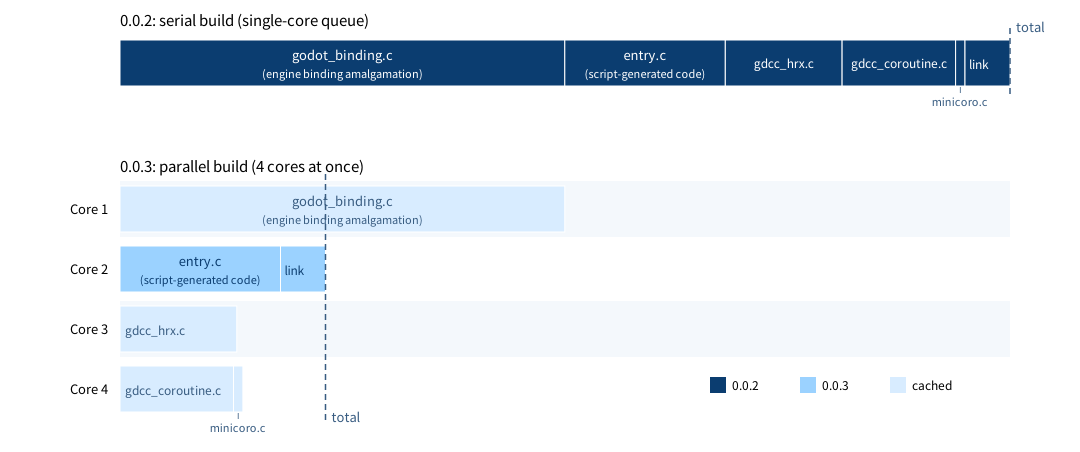
The diagram shows a real GDCC module build: 5 translation units running on 4 cores at once.
More importantly, units that don’t change with your scripts — the engine bindings, the coroutine and hot-reload runtimes — hit the cache directly on rebuilds and don’t need to be compiled again. In day-to-day iteration, the only thing that actually gets compiled is the script-generated entry.c, followed by a single link step to produce the dynamic library.
In-Process Compilation
Fast~ fast~ lightning-fast compilation!
For a typical project of a few thousand lines, going from source to a compiled and linked dynamic library takes less than 0.3 seconds; from clicking the Build button in the editor to a finished hot reload, the whole pipeline takes no more than 1 second.
In the new version of the GDCC editor plugin, the moment you click Build, the editor is already running your new code — the feel is virtually indistinguishable from writing built-in GDScript. GDCC 0.0.3 proves, eloquently, that a compiled workflow can absolutely match the iteration speed of an interpreted one.
To get there, the GDCC compiler now produces native libraries inside its own process — no external C compiler is invoked, and no intermediate files hit the disk.
One less process invocation, one less round trip through the filesystem. Even on Windows — that disaster zone layered with antivirus software and access control — we managed to claw out lightning speed~
The Compiler Server
GDCC can now run as a long-lived background process, offering syntax analysis, diagnostics, and build capabilities to external tools over JSON-RPC. The compiler server is fault-tolerant: even when the code is temporarily broken and the syntax tree incomplete, it can still answer you (or your AI Agent) with “what type is under the cursor” and “what can be completed here”.
It is this service that gives the Godot editor a genuinely IDE-grade experience for the first time. Uh ( ╯□╰ ) looks like I just spoiled the next section…
The Editor Plugin
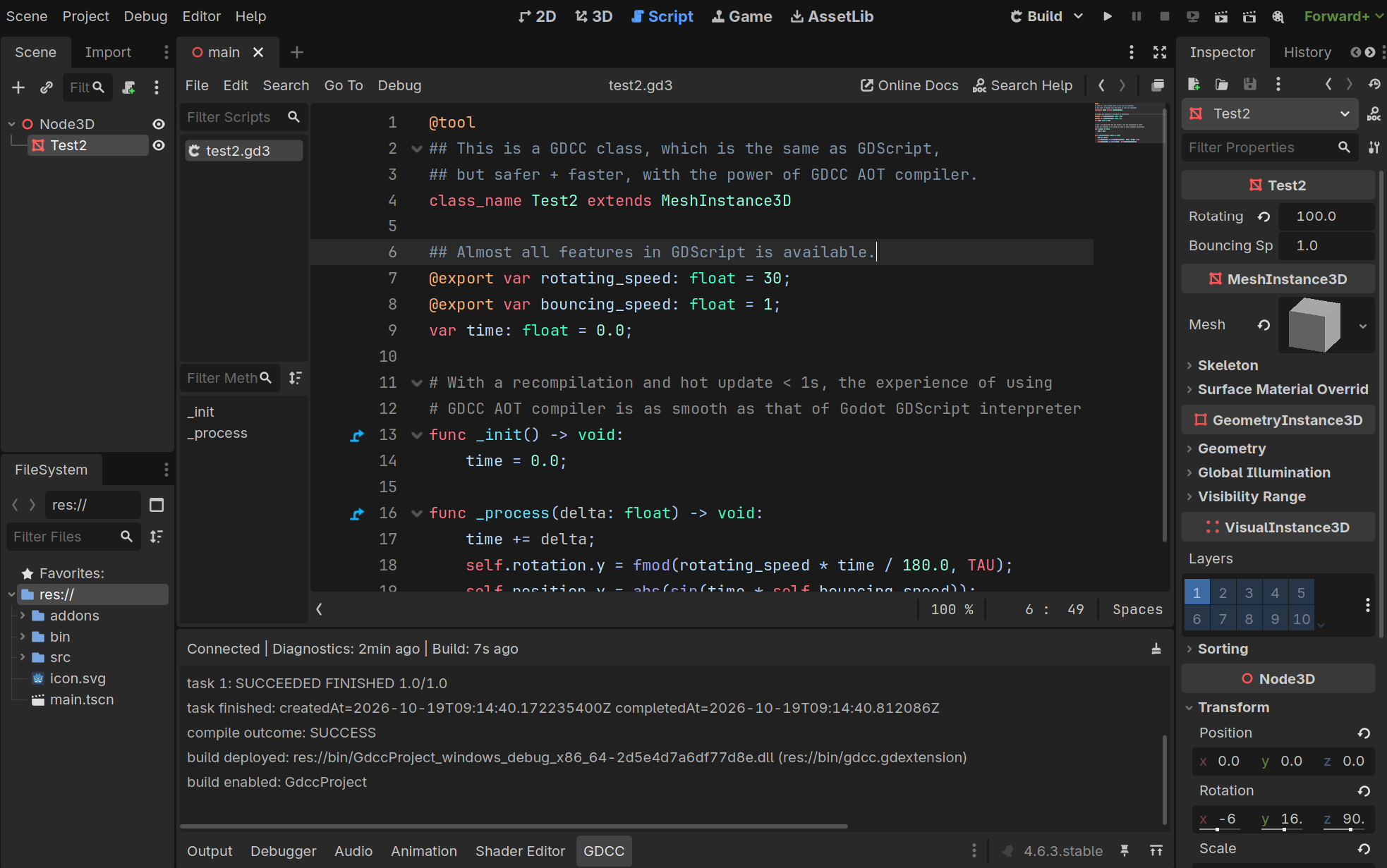
GDCC 0.0.3 brings a complete .gd3 development experience to the Godot editor through a custom Godot plugin, compatible with any Godot editor from 4.5 onward.
You might be wondering what
.gd3is. It’s simply the suffix GDCC uses to recognize scripts that should be compiled by GDCC — by default, GDCC does not compile the.gdscripts in your project. To enable GDCC compilation for a script, just rename its suffix to.gd3.As for why it’s
.gd3… because 3 really does look like two backwards c’s stuck together…
The GDCC editor plugin provides the following features:
Language and editing:
- Real-time diagnostics: checked as you type, with errors and warnings marked live — no need to save.
- Smart completion: members, parameters, keywords, and engine APIs fully covered, with the current parameter highlighted.
- Hover and navigation: hover to view types and docs, one-click jump to definition.
- Outline and highlighting: a sidebar outline for locating functions and members; colors consistent with Godot’s native style.
Build and deployment:
- One-click build: the Build button in the title bar triggers compilation; the dynamic library is deployed and hot-reloaded automatically. A popup panel lets you switch the compiler backend, optimization level, and strict mode.
- Status feedback: the bottom dock shows connection, diagnostics, and build status along with logs.
Environment management:
- Service auto-start and setup wizard: when
gdcc serveisn’t running, it’s launched automatically from your configuration; the wizard can detect and install a JRE and the compiler, setting up the whole toolchain in one click (about 60MB of disk).
Closing
0.0.3 is a milestone release for GDCC: we pushed forward on language completeness, build efficiency, and editor experience at the same time. GDCC has moved from “can compile” to “actually usable”. We’ll keep listening carefully to your feedback as we head toward an ever better GDScript~!
As always, the editor plugin, the Jar, and the platform distributions are available on GitHub Releases. Give it a try, send feedback, get involved.